
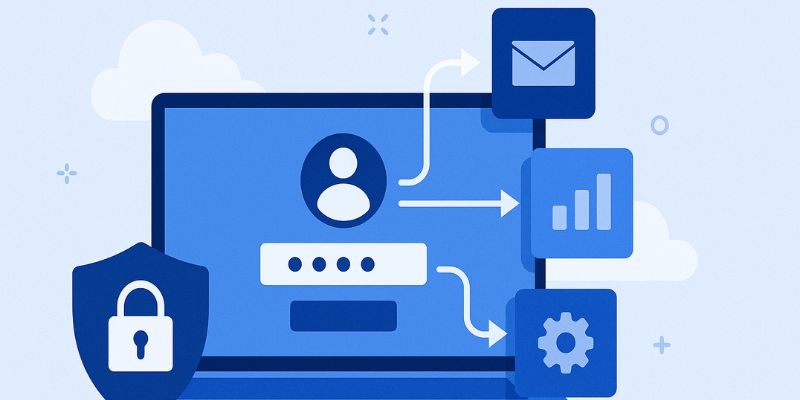
SSO in login refers to a system where users log in once and gain access to multiple applications without needing to log in again for each one.
In today’s digital-first world, users expect seamless and secure access to applications. Whether it's logging into business tools, customer portals, or educational platforms, the demand for easy and secure user authentication is at an all-time high.
Single Sign-On (SSO) has emerged as a transformative solution, addressing the modern login problems faced by both users and IT administrators. With SSO authentication, users can log in once and gain access to multiple applications without the need to remember separate passwords for each service. This guide provides a detailed look into what Single Sign-On is, how it works, its benefits, and how it enhances security in today's interconnected environment.
Table of Contents
- What is Single Sign-On (SSO)?
- How Does SSO Work?
- Benefits of Single Sign-On
- SSO and Security: Is It Safe?
- Common SSO Solutions
- SSO vs Traditional Login
- Conclusion
- FAQs
What is Single Sign-On (SSO)?
Single Sign-On (SSO) is a user authentication process that allows individuals to access multiple applications or systems by logging in just once with a single set of credentials.
In simple terms, SSO enables users to authenticate once and access a suite of related yet independent software systems without logging in again at each one. This means you don't have to remember different passwords for each app you use daily.
SSO Full Form
SSO stands for Single Sign-On.
What is SSO in Practice?
Imagine logging into your company's main dashboard, and from there, gaining access to your email, project management tools, customer database, and analytics platform—all without needing to enter another password. That is the power and simplicity of Single Sign-On (SSO).
How Does SSO Work?
At the core of Single Sign-On is a trust relationship between an identity provider (IdP) and a service provider (SP). Here’s how the process typically works:
- User Attempts to Access an Application: The user tries to open a connected app.
- Redirect to Identity Provider (IdP): The application redirects the user to the IdP.
- Authentication Happens: The user logs in to the IdP using their credentials.
- SSO Token Issued: Once authenticated, the IdP issues an authentication token.
- Token Shared with Application: This token is sent back to the original app to verify the user’s identity.
- Access Granted: The app grants access, and the user can now use the service.
This process enables a seamless and efficient login experience, significantly enhancing user convenience and security.
SSO authentication often relies on open standards like SAML, OAuth, and OpenID Connect for secure information exchange.
Benefits of Single Sign-On
Single Sign-On offers a range of benefits that impact productivity, user satisfaction, and security. Here are the top advantages:
1. Improved User Experience
No need to remember multiple passwords or repeatedly log in to different systems. SSO simplifies access.
2. Enhanced Security
SSO security reduces password fatigue and minimizes the risk of password-related breaches. Coupled with passwordless authentication, SSO can significantly reduce cyber threats.
3. Reduced IT Costs
Fewer password reset requests mean reduced workload for IT helpdesks.
4. Centralized Access Control
With centralized authentication, it’s easier to manage access permissions and enforce security policies.
5. Boosted Productivity
Employees spend less time on login issues and more time on their actual work.
6. Better Compliance
SSO makes it easier to audit login activities and comply with regulations like GDPR, HIPAA, and SOX.
SSO and Security: Is It Safe?
There is often a misconception that SSO is a security risk because it acts as a single point of failure. However, when properly implemented, SSO authentication is one of the most secure ways to manage user access.
Why SSO is Secure:
- Fewer attack surfaces: Less chance of phishing or credential theft.
- Multi-Factor Authentication (MFA): SSO can be paired with MFA for extra security.
- Short session duration: Access tokens can be limited in duration and scope.
- Secure protocols: Uses SAML, OAuth, or OpenID Connect.
What to Watch For:
- If the identity provider is compromised, all connected apps could be at risk.
- Proper configuration and regular auditing are essential.
Passwordless Authentication and SSO
The shift toward passwordless authentication enhances SSO by eliminating weak passwords altogether. Methods include biometrics, hardware tokens, and mobile push notifications.
Common SSO Solutions
Here are some popular SSO solutions used by enterprises:
- Okta - Cloud-based identity management with robust integrations.
- Ping Identity - Comprehensive SSO authentication platform with passwordless capabilities.
- Trevonix - A leader in IAM implementation and managed services, Trevonix offers robust SSO integration services tailored to enterprise needs.
Each of these SSO solutions offers unique features. Choosing the right one depends on your business size, existing tech stack, and compliance needs.
SSO vs Traditional Login
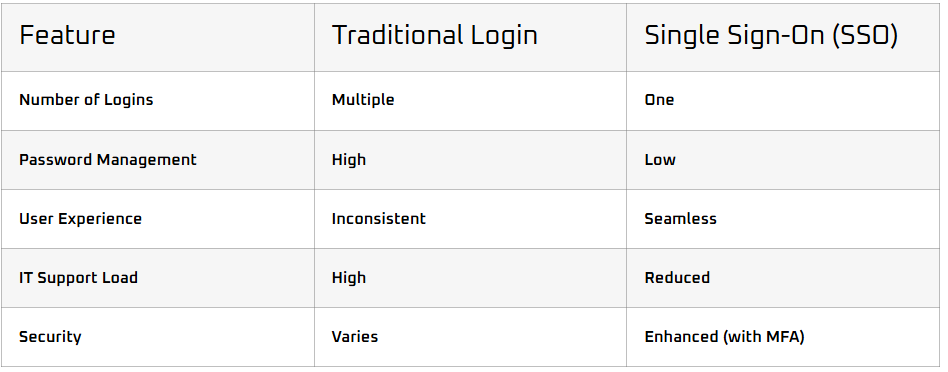
Traditional login systems require a separate authentication for each service. This leads to password fatigue, poor security practices, and lower productivity. In contrast, Single Sign-On (SSO) provides a unified and secure login experience across platforms.
Conclusion
Single Sign-On (SSO) is reshaping the way organizations manage authentication. It offers a secure, efficient, and user-friendly way to access multiple applications with a single login. By leveraging technologies like passwordless authentication and SSO solutions from providers like Trevonix, businesses can enhance both their security posture and user experience.
Whether you are an IT admin, a security analyst, or a business owner, understanding "what is single sign on" and integrating SSO authentication into your systems can be a strategic move toward modern, secure identity management.