

FreeRadius authentication with LDAP (OpenDJ)
Requirements
- freeRadius Software (Version 3.0.21)
- OpenDJ (Version 6.5.3)
- Mac - Linux Environment
Installation
- freeRadius
- Installed through Brew
- # brew install freeradius-server
- OpenDJ
- Download the latest OpendJ from Forgerock backstage and Install it by running the setup command.
- Please make a note of port, password for Directory Manager and BaseDN
Configurations
- freeRadius
- freeRadius files to be modified
clients.conf (/usr/local/etc/raddb/clients.conf)
- we will be using client as localhost and hence ensure
ipaddr = 127.0.0.1 is uncommented and note the client secret
- Configuring your Default site for LDAP Authentication
Following are the two important directories for managing sites
- 'sites-available' (/usr/local/Cellar/freeradius-server/3.0.21/etc/raddb/sites-available)- List of different sites supported by freeRadius. We will be using 'Default' for our usecase
- 'sites-enabled' (/usr/local/Cellar/freeradius-server/3.0.21/etc/raddb/sites-enabled) - list of sites enabled on your freeRadius engine.
- vi the default site. The following section needs to be checked/modified.
Authorize:
In this section, make sure the mschap option is not commented out. mschap protocol will be used in authentication requests from LDAP user accounts.
Authenticate:
Enable LDAP Authentication. Uncomment the ldap lines as shown int he following figure
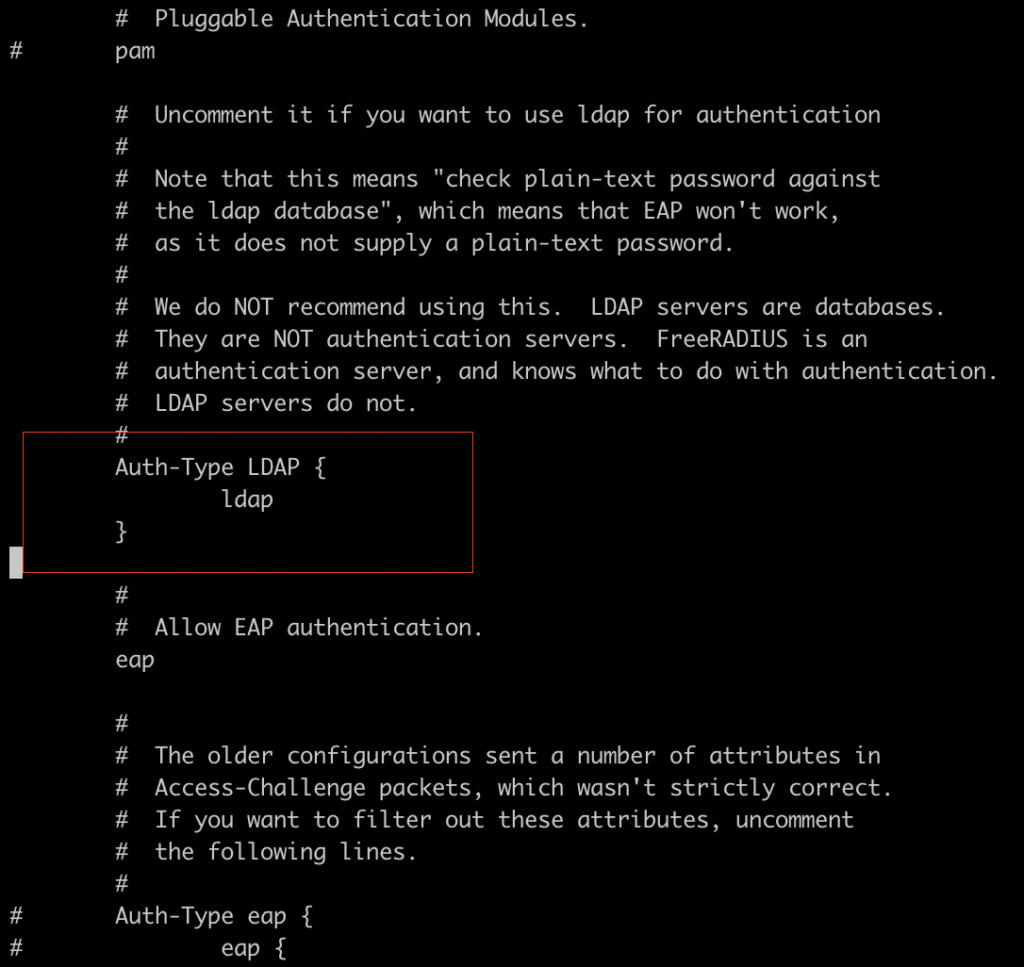
Enabling LDAP module
Followign are the two important directories for managing modules
'mods-available' (/usr/local/Cellar/freeradius-server/3.0.21/etc/raddb/mods-available)- List of available modules supported by freeRadius
'mods-enabled' (/usr/local/Cellar/freeradius-server/3.0.21/etc/raddb/mods-enabled) - list of modules enabled on your freeRadius engine.
you will find ldap in 'mods-available'. Create a softlink in 'mods-enabled' directory
#ln -s ../mods-available/ldap ldap
There are following two things to be modified in ldap module.
vi ldap
1. Update the ldap file with LDAP details as in the following screenshot
2. Update the file to map the NT password attribute as in the following screenshot . We will be enabling samba plugin in OpenDJ to support NTPassword.
OpenDJ
Samba, the Windows interoperability suite for Linux and UNIX, stores accounts because UNIX and Windows password storage management is not interoperable.
When you store Samba accounts in OpenDJ, Samba stores its own attributes as defined in the Samba schema. Samba does not use the LDAP standard userPassword attribute to store users' Samba passwords.
1. Create or choose an account for the Samba Administrator:
Create samba.ldif
dn: uid=samba-admin,ou=people,ou=identities
cn: Samba Administrator
givenName: Samba
mail: samba@example.com
objectClass: person
objectClass: inetOrgPerson
objectClass: organizationalPerson
objectClass: top
sn: Administrator
uid: samba-admin
userPassword: xxxxx
#opendj/bin/ldapmodify -h localhost --port '389' --trustAll --bindDN "cn=Directory Manager" --bindPassword 'xxxxx' samba.ldif
2. Ensure the Samba Administrator can reset user passwords:
Create samba-rights.ldif
dn: uid=samba-admin,ou=people,ou=identities
changetype: modify
add: ds-privilege-name
ds-privilege-name: password-reset
dn: ou=people,ou=identities
changetype: modify
add: aci
aci: (target="ldap:///ou=people,ou=identities") (targetattr ="*")(version 3.0; acl "
Samba Admin user rights"; allow(all) groupdn ="ldap:///uid=samba-user,ou=people,ou=identities";)
#opendj/bin/ldapmodify -h localhost --port '389' --trustAll --bindDN "cn=Directory Manager" --bindPassword 'xxxxx' samba-rights.ldif
3. Set Up the Samba Password Plugin - Enable Plugin
# ./dsconfig
create-plugin ````
4. Install a LDAP Browser. I have used Apache LDAP Browser.
Add 'sambaSamAccount' object class to an exiting user to be used for testing.
It will prompt for a sambaSID. Add any identifier.
Add following two attributes to the user
sambaLMPassword
sambaNTPassword
Sample User
Add the password in plaintext as expected.
Testing
efore you start tests, ensure freeRadius is running in debug mode so that you can see the logs in full
#radiusd -X
Should show 'Ready to process requests'. If you see some error then it needs to be resolved as we changed quite a few files in the process.
There are following two ways of testing it.
1. Command Prompt:
Format: radtest -t mschap %user_name% %user_password% localhost 1812 %nas_password%
Command used for testing
#radtest -t mschap username password localhost 1812 testingxxxx
2. Through Python
You will need Python with Radius module (#sudo easy_install install py-radius)
#python -m radius
Host : localhost
Port : 1812
Enter RADIUS Secret: testingxxx
Enter your username: username
Enter your password: password
Testing
2. https://github.com/OpenIdentityPlatform/OpenDJ/wiki/Samba-Password-Synchronization